BLOG
Fanatec App and Fanatec Control Panel / FanaLab – a Comparison
With the Fanatec App, provides you with a more refined and thoughtfully designed interface to have control over your Fanatec hardware like wheel bases, steering wheels, pedals, etc. Launched in 2025, the new App replaces the old Fanatec Control Panel and FanaLab, and offers some key advantages compared to the legacy software.
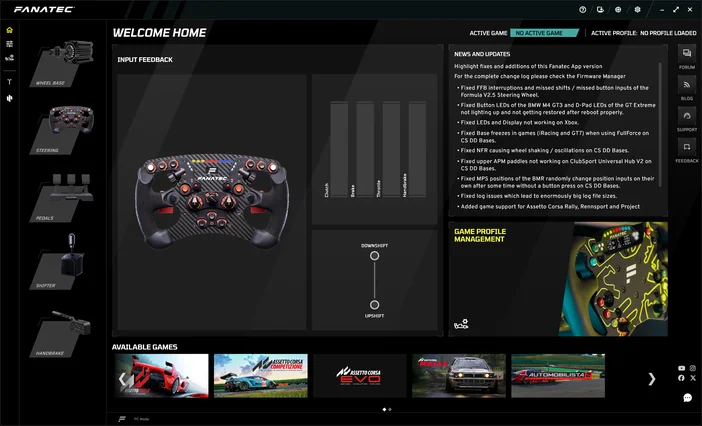
The main differences between the Fanatec App and legacy software
Before the launch of the Fanatec App, there were two separate solutions for controlling your hardware, performing updates, and managing your game profiles – the Fanatec Control Panel and FanaLab.
The Fanatec Control Panel was the old user interface for PC. It contained the driver necessary for your hardware to be able to communicate with Windows. The Control Panel featured sections to set up your Tuning Menu profiles, calibrate and test hardware, and the Firmware Manager to update your components.
If you wanted to expand the functionality of your gear, you also needed FanaLab. For example, FanaLab allowed you to create game-specific profiles and more profiles than the standard five stored in your wheel base. Additionally, by communicating game telemetry, it was also possible to set up customized data on your steering wheel like RevLeds and FlagLEDs.
With the Fanatec App, all these functions have been centralized in one single app to deliver a more streamlined and cohesive user experience. Now, there is no need any more to juggle and jump between two different apps and user interfaces. The Fanatec App also enables Stream Deck functionality which is not possible with older software.
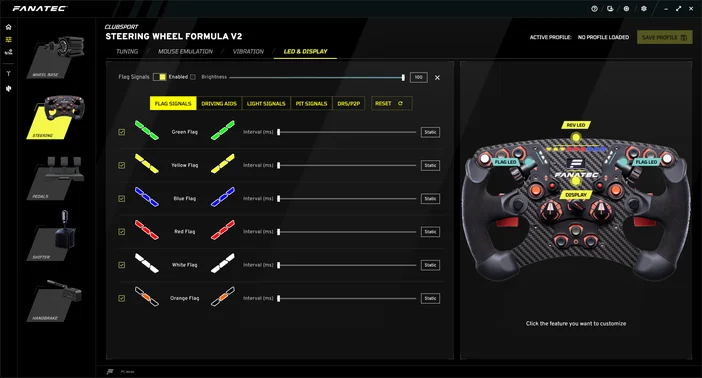
Should I switch to the new Fanatec App?
In short: yes. While the old Fanatec Control Panel and FanaLab can still be downloaded from the Fanatec website and are still functional, there is a caveat. Since software development has been completely shifted to the App, the old software will no longer be updated.
If you want to use the latest Fanatec products like the CSL Steering Wheel GT3, the new Podium DD, or the upcoming Podium Pedals, the App is required. If you’re using legacy software with older supported hardware, you will no longer be be able to install the latest firmware through the Fanatec Control Panel. New firmware can only be made available in the Fanatec App.
Recommended Fanatec App system requirements
- Requires a 64-bit processor and operating system
- OS: Windows 11 with latest Service Packs
- Processor: Intel Core i5-9600 or AMD Ryzen 5 3600X
- Memory: 8 GB RAM
- Graphics: GeForce GTX 1070 8 GB, Radeon RX 580 8GB
- DirectX: Version 11
- Network: Broadband Internet connection
- Storage: 1 GB
Note: The Fanatec App also works with Windows 10 but Windows 11 is recommended.
РЕГИСТРАЦИЯ ПРОДУКЦИИ